Stop Losing Customers: Organize Your Reviews the Smart Way
Marketing & Growth Associate
On this page▾
Your Reviews Are Valuable, But They Are Scattered
A customer hears about your business and decides to check you out. They find your Google profile first. Then they look for your website, search social media, and perhaps open Yelp or TripAdvisor. If they are still interested, they may scroll through Instagram to see whether the business feels active.
That is a lot of work to ask from someone who has not decided to trust you yet.
Most businesses do not have a review problem. They have an organization problem. The proof is already there, but it is split between platforms, buried in social posts, or sitting in a dashboard only the business owner sees.
The average consumer uses six review sites while choosing a business. That means a strong rating on one platform may not tell the whole story, especially when a customer expects to find reassurance elsewhere.
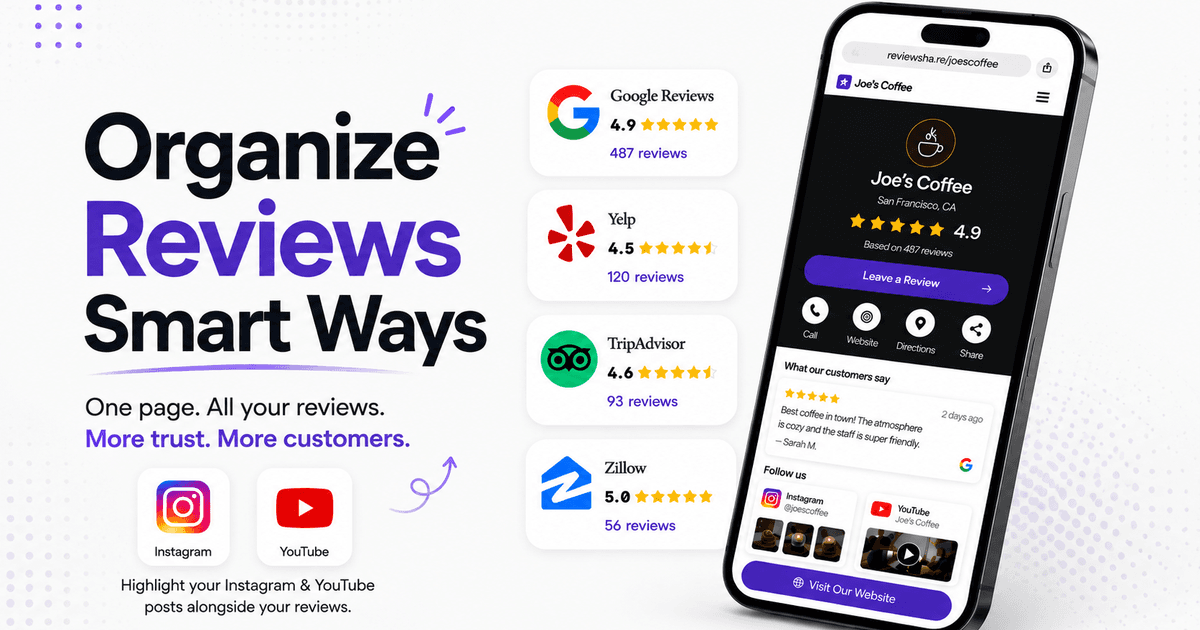
ReviewShare brings that scattered proof together. Businesses can connect review platforms, collect feedback directly, and present their reputation through one branded page that is easy to share.
How Disorganized Reviews Cost Your Business
Customers rarely announce that they left because they could not find enough proof. They simply close the tab, choose a competitor, or tell themselves they will come back later.
Scattered reviews create a few common problems:
· A prospective customer sees only part of your reputation.
· Strong reviews on a less obvious platform go unnoticed.
· Old feedback appears more prominent than recent customer experiences.
· Website visitors have to leave your site to look for reassurance.
· Your team spends time switching between platforms and sharing several different links.
Recency makes this more urgent. A business may have hundreds of positive reviews, but if the latest visible feedback is a year old, customers can wonder whether the service is still as good.
We covered that change in more detail in Why Customer Reviews Matter More Than Ever in 2026.. The short version is simple: customers look beyond an average star rating. They also notice how recent, consistent, and believable the feedback feels.
What It Means to Organize Customer Reviews
Organizing reviews does not mean copying every comment into a spreadsheet. It means giving your business a simple system for bringing feedback in, deciding where it appears, and making it easy for customers to find.
A useful review system should help you:
· Connect the platforms where customers already leave feedback.
· Import reviews you have already earned.
· Collect new reviews without sending customers through a complicated process.
· Display selected feedback on a branded page or website.
· Share one clear destination instead of several platform links.
ReviewShare is built around that workflow. Your Google, Yelp, TripAdvisor, and Zillow reviews can sit alongside direct customer submissions. You can also connect social content from Instagram and YouTube, giving visitors more context than a star rating alone.
Nothing replaces the original platforms. ReviewShare works with them and gives customers a clearer way to see the reputation you have built across them.
Bring Reviews from Multiple Platforms into One Place
Google may be the first place many customers look, but it is not the only one. BrightLocal's 2026 survey found that consumers use an average of six review sites, while platforms such as Facebook and TripAdvisor gained usage. YouTube, Instagram, and TikTok also became more common sources of local recommendations.
This is why choosing one platform and ignoring the rest can leave gaps. A restaurant may have years of useful feedback on TripAdvisor. A real estate professional may depend on Zillow. A home service business may have most of its review volume on Google and Yelp.
ReviewShare lets a business connect the platforms that fit its industry and bring the feedback into one organized view. Customers can see a fuller reputation without opening a row of browser tabs. The business also gets a central place to manage what appears on its public Review Page.
If you are deciding which platform deserves attention first, read Google Reviews vs. Yelp Reviews: Where Should You Focus First? The answer depends on your industry and customer habits, but organizing both prevents good feedback from being left out of the buying decision.
Give Customers One Link to Check Your Reputation
People are more likely to check your reviews when the path is obvious. A single ReviewShare link can go anywhere a prospective customer may pause before contacting you:
· An Instagram or YouTube profile
· A booking confirmation
· A digital business card
· A QR code at your location
· A follow-up message after an inquiry
Think of it as a link-in-bio page built around trust. Instead of sending visitors to a generic list of destinations, you can lead with customer experiences, then guide them toward your website, booking page, social channels, or contact details.
This also makes your marketing more consistent. Your team shares the same link, and customers reach the same branded page wherever they find you.
Add Review Proof to Your Website
Positive reviews often send people to the business website. BrightLocal reports that 54% of consumers visit a company's website after reading positive feedback. If the proof disappears when they arrive, the customer may have to start researching again.
ReviewShare website widgets help keep that confidence moving. You can choose a widget style, customize it for your business, and add the provided code to your site. The reviews can appear near a service description, on a landing page, or beside a booking button where they support the next decision.
Placement matters. A testimonial carousel hidden at the bottom of an About page will not help much if customers hesitate on a pricing or service page. Put relevant feedback close to the action you want visitors to take.
For example, a property agent could display Zillow reviews beside a consultation form. A restaurant could place recent Google and TripAdvisor comments near its reservation button. A contractor could show reviews mentioning reliability on the page for that specific service.
Keep Collecting Fresh Reviews
Organizing past reviews solves only half of the problem. Your review page needs current feedback if it is going to represent the business customers will experience today.
ReviewShare includes a built-in form that businesses can send directly to customers. Someone can leave feedback without searching for the right profile or creating a complicated trail of logins. The submission then becomes part of the business's ReviewShare workflow and can be selected for the public page.
The easiest time to ask is soon after the experience, while the details are still fresh. Add the form link to a thank-you email, completion message, receipt, or booking follow-up. A QR code also works well for in-person businesses.
Avoid asking only when you remember. A small, repeatable process produces a steadier flow of reviews and gives future customers a more accurate picture of the business.
Build A Review System You Can Maintain
Review management tends to fall apart when it depends on one person checking several accounts every day. A simpler routine is easier to keep going.
Start with four steps:
· Connect the review platforms that matter most to your customers.
· Import the useful reviews you have already collected.
· Create your branded ReviewShare page and choose the reviews you want to feature.
· Add your review form and ReviewShare link to the customer messages you already send.
Once the basics are in place, add a website widget and review the page regularly. Check whether the visible reviews are recent, whether they reflect your current services, and whether the links still lead customers to the right next step.
You do not need a perfect library before publishing. Two or three strong reviews are enough to preview the page and start sharing it. The page can grow as new feedback arrives.
Final Thought
You may already have enough positive feedback to win the next customer. The problem is that the customer may never see it.
ReviewShare turns reviews from separate platforms into one useful part of the customer journey. It gives your business a branded page to share, a form for collecting new feedback, and website widgets that place real customer experiences close to the decision.
Do not make people hunt for reasons to trust you. Put those reasons in one place and give them one link.
Create your ReviewShare page and start organizing the reviews you have already earned.
FAQs
Why should I organize customer reviews?
Organized reviews give prospective customers a fuller and more current picture of your business. They also reduce the need to search through separate profiles before making a decision.
Which platforms can I connect to ReviewShare?
ReviewShare is designed to bring together feedback from platforms such as Google, Yelp, TripAdvisor, and Zillow. Businesses can also integrate content from Instagram and YouTube. Available connections may depend on the current product plan and integration setup.
Can I collect reviews directly through ReviewShare?
Yes. ReviewShare includes a built-in review form that you can send to customers. Direct submissions can be managed in your dashboard and selected for display on your Review Page.
Can I put ReviewShare reviews on my website?
Yes. ReviewShare provides customizable website widgets and embed code so you can display reviews on relevant pages of your site.
Where should I share my ReviewShare link?
Add it anywhere customers look for reassurance, including social media bios, email signatures, booking confirmations, proposals, receipts, QR codes, and your website.