Google Business Profile: Build Visibility, Trust, and More Value From Your Reviews
Marketing & Growth Associate
On this page▾
Google Business Profile: Build Visibility, Trust, and More Value From Your Reviews
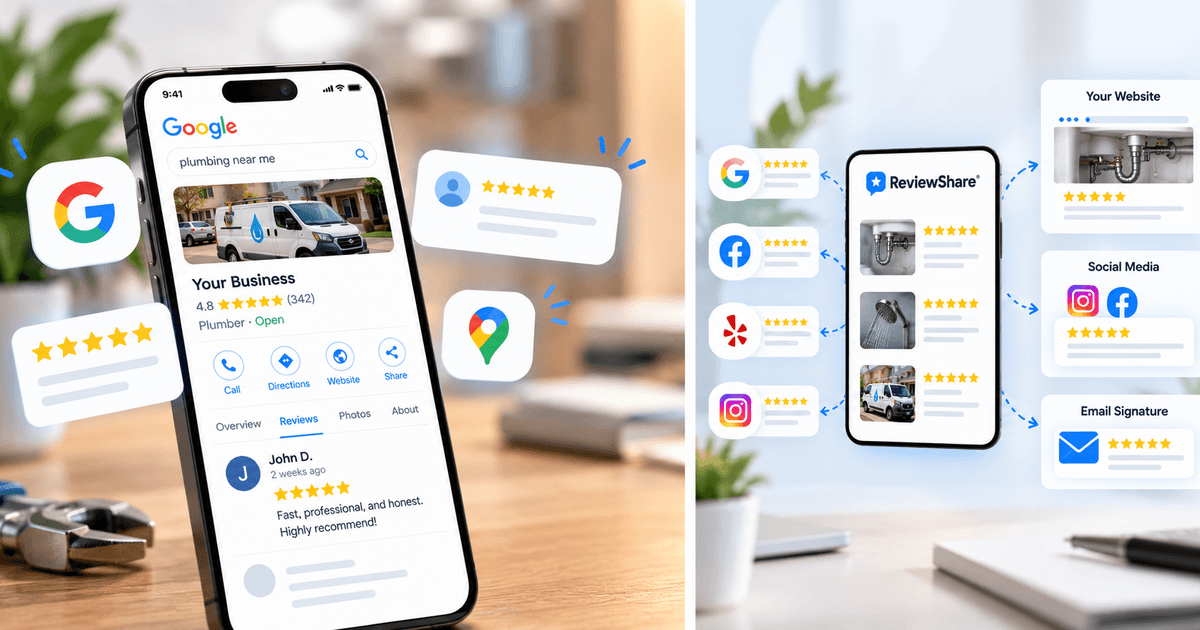
Before a customer ever reaches a company's website, a local search on Google will often lead them straight to its Google Business Profile. This listing provides an immediate summary of the business—including hours of operation, contact details, directions, offered services, photos, ratings, and customer feedback—allowing potential clients to evaluate options upfront.
Ensuring your details are accurate while gathering authentic customer reviews helps potential clients discover your company and know what to expect, making your Google Business Profile an essential element of your digital footprint.
The feedback clients publish on your profile serves as compelling social proof. Beyond Google itself lies a broader advantage: these insights can be strategically deployed across your website, social channels, booking workflows, and key touchpoints where prospective clients evaluate their options.
This guide covers how to optimize your Google Business Profile, collect and manage Google reviews, and make better use of the customer feedback you have already earned.
What Is a Google Business Profile?
Formerly called Google My Business, a Google Business Profile is a no-cost listing that enables qualifying organizations to control their presence on Google Maps and Google Search.
Google explains that Business Profiles empower organizations to keep details current, engage with clients, gather and reply to reviews, and attract new prospects via Maps and Search.
Based on the enterprise type and profile completeness, prospective customers can review operating hours, contact numbers, street or service locations, websites, offerings, media, announcements, and ratings without needing to visit the main website.
Source: Google Business Profile Help
Rather than serving as a basic online directory entry, a Google Business Profile functions as a comprehensive snapshot for local enterprises. Directly within search results, potential clients can instantly evaluate what services are offered, geographic service areas, business hours, and customer experiences.
Why Google Business Profile Optimization Matters
Setting up a listing is merely the first step. Operating hours shift, new available services, and outdated images may no longer reflect the present customer experience. Effective Google Business Profile optimization relies on ensuring details remain current, precise, and reflective of your brand.
According to Google, local search rankings depend mainly on relevance, distance, and prominence. Keeping business details complete and accurate helps Google interpret your offerings and connect your profile to prospective clients. Furthermore, strong ratings and favorable reviews enhance your local prominence.
Because no single tactic guarantees a top local placement, organizations should prioritize building a comprehensive, highly useful listing for active searchers.
Start With Complete and Accurate Business Information
Begin with the information customers are most likely to need. Check your business name, address or service area, phone number, website, opening hours, business category, and the products or services listed on your profile.
Opening hours deserve particular attention. If your hours change during holidays, events, or certain seasons, keep those changes reflected on your profile. Someone who finds outdated hours may not take the extra step of visiting your website to check whether they are correct.
Ensuring alignment between what users see on Google and what they encounter in reality is the primary objective.
Choose Categories That Accurately Describe Your Business
Your business category helps explain what your company does. Choose a primary category that most closely represents your main business, then use additional categories when they genuinely apply to other parts of what you offer.
Avoid adding unrelated categories simply because they contain keywords you would like to rank for. Accurate categories are more useful to both Google and the person trying to understand whether your business matches what they need.
Add the Products and Services Customers Are Looking For
Where available, use your profile to clearly list the products or services your business provides. Being specific can give customers more useful information than relying on a broad description alone.
For example, a cleaning company may provide residential cleaning, carpet cleaning, window cleaning, and move-out cleaning. Listing those services gives someone researching the company a clearer picture of whether it provides the particular service they need.
The same principle applies across industries. A profile should make it easy for someone to understand what the business actually does.
Write a Clear Business Description
Your business description gives you space to briefly explain who you are, what you offer, and where you operate. It should sound like an introduction to the business rather than a collection of search terms.
Google currently allows a business description of up to 750 characters and recommends focusing on relevant information about the business rather than promotions, prices, or sales.
Relevant keywords can appear naturally when they genuinely describe your services and location. There is no need to repeat the same phrases simply to make the description appear more optimized.
Keep Your Photos and Videos Current
Photos can help turn basic business information into something more tangible. They give people a better sense of the place, people, products, or work behind the listing.
Ideal imagery varies depending on the nature of the company: a restaurant can feature signature dishes and its dining environment, whereas a salon might showcase interior design alongside examples of completed styling work. Similarly, contractors can highlight finished projects, and real estate agencies can share images of their office space and team.
Google advises publishing photos and videos that provide insight into offered products and services. Frequently updating these media assets helps ensure the profile accurately reflects current operational standards and customer experiences.
Why Google Reviews Matter for Local Businesses
Your profile can tell someone what your business does, but reviews add another perspective: what customers experienced after choosing it.
Google reviews appear alongside Business Profiles in Search and Maps, which means people can encounter customer feedback while they are actively researching a local business. Google also states that more reviews and positive ratings can contribute to local ranking.
Source: Google – Tips to Improve Your Local Ranking
Reviews offer value far beyond a basic numerical rating. Specific feedback—such as notes on prompt communication, effective problem-solving, overall service quality, or standout aspects of the experience—helps address key questions prospective clients might have.
Because of this, customer feedback serves as compelling social proof. Rather than relying solely on promotional messaging from the company, potential clients can evaluate genuine experiences shared by existing customers.
How to Collect More Google Reviews
Even customers who have had an excellent experience may not think to leave a review on their own. Building a simple review request into your customer workflow can make it easier to collect feedback consistently.
Google allows businesses to create a direct review link or QR code that customers can use to leave feedback. Google suggests sharing the link through channels such as thank-you emails, receipts, or at the end of a customer interaction.
Source: Google Business Profile Help
Ask When the Experience Is Still Fresh
The best time to ask for a review depends on the type of business and the customer journey. A service business might ask after completing a job, a real estate agent after a closing, a salon after an appointment, or an online business after an order has been delivered.
The request itself doesn't need to be complicated. A short follow-up thanking the customer and asking them to share their experience can be enough.
Making review requests a regular part of the customer journey is also more sustainable than occasionally running a large push for new reviews.
Make Leaving a Review Easy
If someone has to search for your business, locate the correct profile, and then figure out how to leave a review, you are adding unnecessary steps.
A direct Google review link removes much of that friction. It can be included in follow-up emails, messages, receipts, or other communication that already happens after a customer interaction.
The easier it is to reach the review form, the easier it is for customers who want to share their experience to do so.
Focus on Genuine Customer Feedback
Rather than striving to fabricate an ideal rating, a review strategy should center on gathering genuine feedback from customers.
Businesses are forbidden by Google from incentivizing reviews and from selectively requesting positive feedback while filtering out negative experiences. Companies must invite customers to share candid opinions instead of dictating the rating or content of their submission.
The true value of an authentic review lies in the fact that it directly reflects the customer's perspective.
Managing Google Reviews Is Just as Important as Collecting Them
A review strategy shouldn't end when the review is published. Responding to feedback gives businesses an opportunity to acknowledge customers and show that someone is paying attention to what they have to say.
Positive reviews can usually be answered with a simple, relevant response. When a review is critical, the better approach is generally to remain professional, acknowledge the customer's concern, provide useful context where appropriate, and offer a way to continue the conversation if the issue needs to be resolved privately.
Google recommends responding to reviews because it shows customers that their feedback matters. Businesses can also report reviews that violate Google's policies, although disagreement with a review alone isn't grounds for removal.
Reviews can also reveal useful patterns. If customers repeatedly mention your communication, responsiveness, atmosphere, expertise, or a particular service, that tells you something about what people value. Recurring complaints can be just as informative, especially when they point to an aspect of the customer experience that may need attention.
Managing reviews is therefore about more than protecting a star rating. It can help you better understand the reputation customers are building around your business.
Your Google Reviews Can Do More Than Sit on Google
Once a business has collected a strong set of Google reviews, there is an easy opportunity to overlook: those reviews are primarily being seen by people who actually visit the Google Business Profile.
A customer who discovers your business through Instagram may not see them. Someone who lands directly on a service page may not think to search Google for additional proof, and a person already on a booking page may make their decision without ever encountering your strongest customer feedback.
Those reviews have already been earned. Making them useful in other parts of your marketing can help more potential customers see the experiences behind your reputation.
Put Google Reviews Where Customers Are Making Decisions
Google doesn't have to be the only place where your Google reviews support your business. Relevant customer feedback can also be displayed on the pages where people are comparing services, considering a booking, or deciding whether to get in touch.
A real estate agent, for example, could feature seller testimonials on a page explaining their seller services. A personal trainer could display client experiences near a consultation form, while a restaurant could showcase customer feedback close to its reservation section.
In each case, the customer doesn't need to leave the website and search for additional proof elsewhere. The review is already available at a point where it can provide useful context.
Give Your Reviews a Shareable Home
Your website isn't the only place where customers may encounter your business. Social profiles, emails, direct messages, presentations, and other channels may offer much less space to communicate your reputation.
A single shareable page can give people one place to see the reviews, testimonials, and social proof you want to highlight. Rather than asking someone to check several different platforms, you can give them a direct path to the customer experiences that best represent your business.
This turns your reputation into something you can actively share instead of something customers have to piece together themselves.
Go Beyond Written Reviews
Some of your strongest customer feedback may not arrive as a Google review. A customer might mention your business in a social post, send you a testimonial directly, or record a video describing their experience.
Written reviews, social posts, and video testimonials all communicate trust in slightly different ways. Bringing those different forms of proof together can give prospective customers a more complete picture of what people think about your business.
Bring Your Google Reviews and Social Proof Together With ReviewShare
As customer feedback grows, it can become scattered across different places. Your Google reviews stay on Google, other reviews may live on platforms such as Yelp, Zillow, or Tripadvisor, and customer shoutouts may be sitting across your social channels.
ReviewShare helps bring that proof together in one place. Businesses can connect supported review platforms, bring in existing reviews, add other testimonials and social posts, and organize the customer experiences they want to showcase.
Instead of treating each platform as a separate destination, you can start treating the reviews you've earned as marketing assets that can be used wherever potential customers are deciding whether to trust your business.
Display Reviews on Your Website
ReviewShare's customizable website widgets allow selected reviews to be displayed directly on your site. This makes it possible to put customer feedback closer to important actions such as requesting a quote, booking an appointment, making a reservation, or contacting the business.
The reviews you choose to display can also match the context of the page. Instead of showing every review everywhere, businesses can highlight customer experiences that are particularly relevant to the service or audience viewing that page.
Organize the Customer Stories You Want to Highlight
Different reviews communicate different strengths. One customer may talk about responsiveness, another may highlight expertise, while someone else may describe a specific service or outcome.
ReviewShare's Review Groups let businesses organize selected reviews and social posts so that the most relevant customer stories are easier to showcase. This can be particularly useful for businesses offering multiple services or serving different types of customers.
Share Your Reputation Through One Branded Page
ReviewShare also provides a branded Review Page that brings selected reviews, testimonials, and social proof together through one shareable link.
That page can be added to a social bio, website, or email, or shared directly with a potential customer. Instead of sending people from Google to another review platform and then to social media, you can give them one place to explore the reputation your business has already built.
Track How Your Google Business Profile Is Performing
Google Business Profile optimization isn't a one-time task. Businesses change, customers search differently, new reviews come in, and the information people need from your profile can change over time.
Google provides performance data that can help businesses understand how people discover and interact with their profiles on Search and Maps. Depending on the profile, this can include information such as profile views, search terms, website clicks, phone calls, direction requests, and other customer interactions.
Review these numbers periodically rather than looking at them in isolation. An increase in profile visibility is useful, but what happens next matters too. Website visits, inquiries, calls, bookings, and purchases can provide a fuller picture of whether your local presence is helping move customers toward action.
The same thinking applies to the reviews you use outside Google. If customer feedback is being displayed on your website or shared through your Review Page, pay attention to how those pages contribute to the broader customer journey.
At the end of the day, gathering a high volume of feedback is only part of the equation. The true objective is transforming the credibility earned through those reviews into a tangible driver of value for your organization.
Google Business Profile Optimization Checklist
Once the basics are in place, maintaining a Google Business Profile becomes much easier. Use this checklist as a regular reminder of what to review:
- Claim and verify your Google Business Profile.
- Keep your business name, address or service area, phone number, and website accurate.
- Update regular and special opening hours.
- Choose categories that accurately represent the business.
- Add relevant products and services.
- Write a clear and useful business description.
- Upload current photos and videos.
- Keep your profile information updated as the business changes.
- Create a consistent process for requesting genuine Google reviews.
- Give customers a direct and easy way to leave feedback.
- Respond professionally to new reviews.
- Pay attention to recurring themes in customer feedback.
- Review your Google Business Profile performance.
- Display useful customer reviews on relevant website pages.
- Bring reviews, testimonials, and other social proof together so they can be used beyond Google.
Make the Reviews You've Earned Work Harder
A well-maintained Google Business Profile can help customers discover your business, understand what you offer, and see what previous customers have experienced. Keeping your information accurate, adding useful photos and services, collecting genuine reviews, and responding to customer feedback all contribute to a stronger profile.
But a good Google review doesn't have to stop working once someone leaves Google. The same feedback can support a service page, add reassurance near a booking form, strengthen a social profile, or help someone who has already heard about your business decide whether to take the next step.
ReviewShare helps businesses bring those reviews together with testimonials and other social proof, organize the customer stories they want to highlight, display selected reviews through customizable website widgets, and share their reputation through one branded Review Page.
Your customers have already shared why they chose and trusted your business. Make that proof easier for the next customer to find.