
Google Reviews Widget Alternative: A Closer Look at ReviewShare
Marketing & Growth Associate
On this page▾
Google Reviews widgets are a familiar feature on business websites. They offer a straightforward way to display customer ratings and testimonials without requiring visitors to leave the page. For businesses that simply want to showcase their Google reputation, a traditional review widget often does the job.
ReviewShare takes a broader approach. Alongside customizable Google Reviews widgets, it brings customer feedback from multiple platforms into one workspace, with options to organize reviews, choose different display layouts, and share customer experiences beyond the website.
The difference isn't necessarily about displaying more reviews. It's about having greater control over which reviews appear, how they're presented, and where customers encounter them.
This guide compares traditional Google Reviews widgets with ReviewShare's approach, covering layouts, customization, review organization, and practical website applications to help businesses decide which solution fits their needs.
What Does a Google Reviews Widget Actually Do?
A Google Reviews widget is an embeddable website component that displays customer feedback from a business's Google Business Profile.
Instead of manually copying testimonials, businesses connect their Google reviews to a widget provider, choose a layout, and embed the resulting display on their website.
Depending on the provider, widgets may include:
- Star ratings and written customer reviews
- Carousel, grid, list, or badge layouts
- Review filtering and customization options
- Automatic review updates
- Mobile-responsive displays
For example, a plumbing company might place a review carousel beside its emergency repair service description. Visitors can read previous customers' experiences while deciding whether to request assistance.
Traditional widgets handle this task effectively.
The distinction becomes important when businesses need more than a general review feed, particularly when they offer several services or receive feedback across multiple platforms.
Traditional Google Reviews Widgets vs. ReviewShare: Feature Comparison
ReviewShare includes website review widgets but also provides tools for organizing, collecting, and sharing customer feedback.
Here's how the two approaches compare.
Feature | Traditional Google Reviews widget | ReviewShare |
Display Google reviews | Yes | Yes |
Widget layouts | Varies by provider | Carousel, bento, marquee |
Review customization | Varies by provider | Customizable display options |
Review organization | Varies by provider | Review Groups |
Multiple review sources | Not always included | Google, Yelp, Zillow, TripAdvisor |
Branded review page | Not typically included | Yes |
Review collection | Depends on provider | Forms, links, QR codes, invitations |
Sharing outside websites | Usually requires another destination | Shareable ReviewShare Page |
A traditional widget remains a reasonable choice for businesses that only want to display a few Google reviews.
ReviewShare becomes more relevant when reviews need to serve different website sections, represent multiple platforms, or support customer conversations outside the website.
ReviewShare Widget Layouts: Carousel, Bento, and Marquee
ReviewShare provides three widget layouts, each designed for a different way of presenting customer feedback.
Choosing the appropriate layout matters because visitors interact differently with a homepage, service page, and dedicated testimonial section.
Carousel Widget: Compact Reviews for Service Pages
A carousel displays customer reviews as a sequence of cards.
It's particularly useful when reviews need to support existing content without occupying too much space.
A cleaning company, for example, could place a carousel beneath its carpet cleaning service description, featuring testimonials about stain removal, punctuality, and service quality.
Best suited for:
- Homepages featuring selected customer reviews
- Service pages with limited space
- Booking sections where testimonials support the main action
The main consideration is readability. Visitors should have enough time and control to read each review, particularly on mobile devices.
Bento Widget: A More Detailed Review Display
A bento widget arranges customer reviews into a structured collection of cards.
Unlike a carousel, which presents reviews sequentially, a bento layout lets visitors scan several experiences together.
This makes it suitable for businesses with detailed testimonials covering different aspects of their services.
For example, a real estate agency could showcase customer stories about property searches, negotiations, communication, and closing experiences in one organized section.
Best suited for:
- Dedicated testimonial pages
- Service landing pages
- Businesses with detailed customer stories
Bento layouts work particularly well when the reviews themselves deserve substantial attention rather than serving as supporting content.
Marquee Widget: Continuous Customer Feedback
A marquee presents reviews in a horizontally moving display.
It works well for shorter testimonials and compact website sections where businesses want to introduce customer feedback without creating a large review gallery.
A restaurant could use a marquee to feature brief customer comments about food, atmosphere, and service.
However, longer testimonials are generally better presented in stationary layouts.
Best suited for: Homepage introductions, promotional sections, and short customer review highlights.
Which Widget Layout Works Best?
Website section | Recommended widget | Main advantage |
Homepage | Carousel or marquee | Compact presentation |
Service page | Carousel | Keeps reviews near relevant content |
Testimonial page | Bento | Displays multiple detailed reviews |
Booking section | Carousel | Supports the booking action |
Promotional landing page | Bento or carousel | Highlights selected experiences |
Suggested visual: Three actual ReviewShare widget screenshots showing carousel, bento, and marquee layouts side by side.
ReviewShare Review Groups: Display the Right Reviews in the Right Places
A widget determines how reviews appear. But businesses also need to decide which customer experiences belong in each display.
Consider a real estate agent working with first-time buyers, home sellers, and relocation clients.
A general Google Reviews widget might display positive feedback from all three groups. However, someone preparing to sell a property is likely more interested in reviews discussing pricing, negotiations, and selling experiences.
ReviewShare's Review Groups allow businesses to organize customer feedback by service, topic, or location.
For example:
Review Group | Relevant customer experiences |
First-Time Buyers | Guidance, communication, purchasing process |
Home Sellers | Pricing strategy, negotiations, closing |
Relocation Clients | Local knowledge, remote coordination, moving support |
This makes it easier to identify testimonials that address the concerns of different customers.
A similar approach works for cleaning companies, salons, fitness studios, and other businesses offering multiple services.
Instead of displaying the same general collection everywhere, businesses can select reviews that relate to what visitors are evaluating.
The result is a more purposeful review display without requiring businesses to collect entirely new testimonials for every website section.
Bring Google, Yelp, Zillow, and TripAdvisor Reviews Together
Customer feedback rarely exists on just one platform.
Restaurants receive reviews on Google, Yelp, and TripAdvisor, while real estate professionals often build their reputations through Google and Zillow.
Each platform contains experiences that may be valuable to different audiences.
ReviewShare supports bringing reviews from these sources into one workspace, allowing businesses to organize and select feedback without managing every display separately.
For example, a restaurant promoting private dining might feature Google reviews about customer service alongside TripAdvisor feedback describing group dining experiences.
The important distinction is relevance.
Combining review sources doesn't mean every review needs to appear on the website. It gives businesses a broader collection from which to select appropriate customer experiences.
ReviewShare also supports showcasing social content alongside traditional reviews, allowing businesses to feature additional customer experiences where relevant.
Suggested infographic: Google, Yelp, Zillow, and TripAdvisor feeding into ReviewShare, followed by the three widget layouts and a shareable review page.
How to Add ReviewShare Widgets to Your Website
ReviewShare follows a practical workflow: bring in your reviews, choose what to display, configure a widget, and embed it on your website.
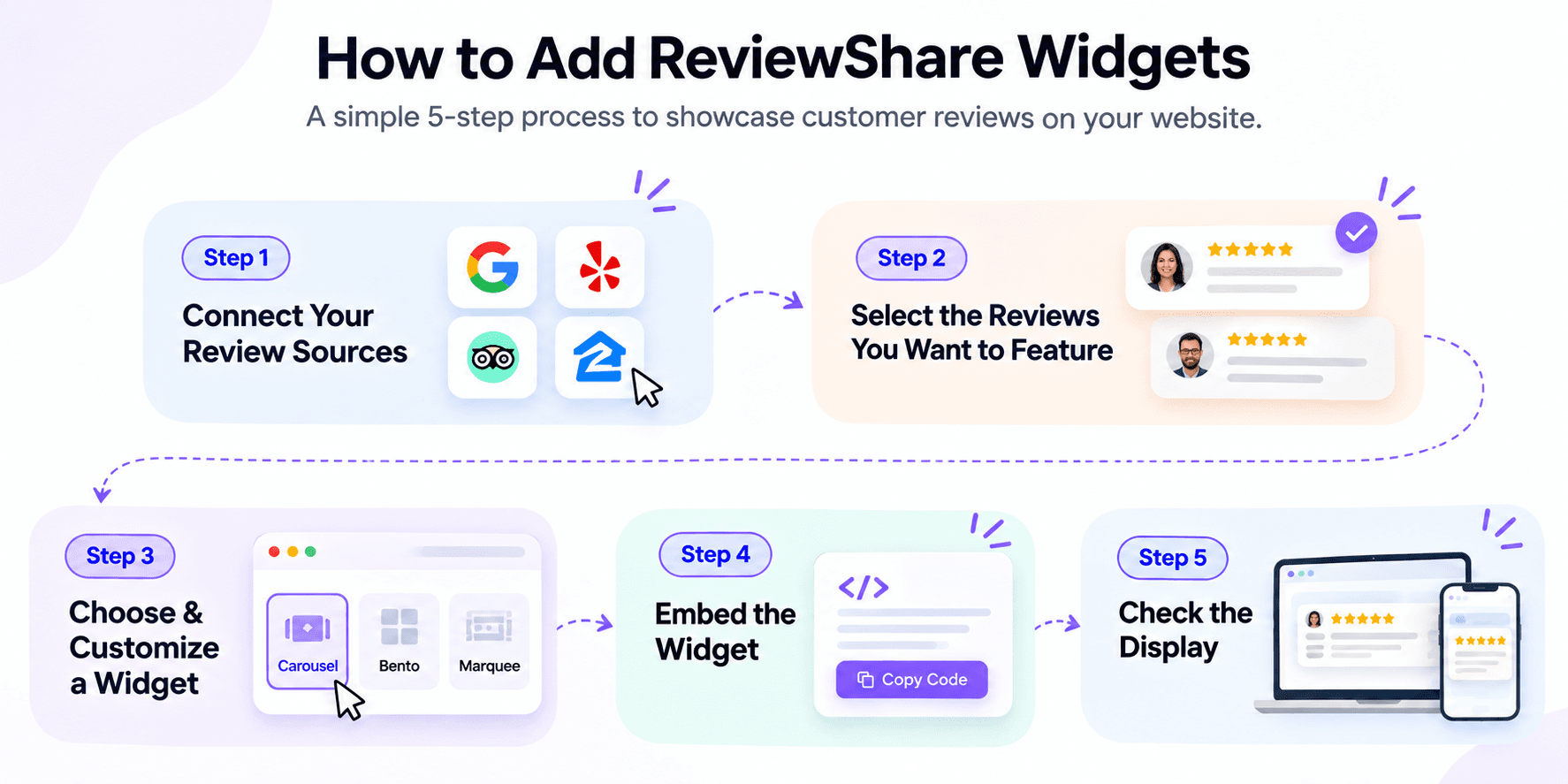
The exact controls depend on the available dashboard features and website platform.
Step 1: Connect Your Review Sources
Start by importing customer feedback from supported platforms.
If your business receives reviews from several sources, bring the relevant collections into ReviewShare before configuring the display.
Step 2: Select the Reviews You Want to Feature
Choose testimonials that match the website section where the widget will appear.
A homepage might feature a broader selection, while a service page benefits from feedback describing that particular service.
Review Groups help organize reviews when several services or customer categories are involved.
Step 3: Choose and Customize a Widget
Select carousel, bento, or marquee based on the available space and review content.
Adjust the available design settings to complement your website.
Prioritize legible text, appropriate spacing, and a layout that works on smaller screens.
Step 4: Embed the Widget
Copy the widget's generated embed code and add it to the appropriate section of your website using its supported custom-code or embed functionality.
Preview the result before publishing.
Step 5: Check the Display
Review the published page on desktop and mobile.
Confirm that the widget loads correctly, the testimonials are readable, and the display doesn't interfere with booking buttons or other important content.
If you're replacing an existing widget, remove its unused embed code to avoid loading unnecessary scripts.
When Is ReviewShare a Better Fit Than a Basic Google Reviews Widget?
Consider a cleaning company with Google and Yelp reviews covering residential cleaning, carpet cleaning, and move-out services.
A basic Google Reviews widget would allow the company to display its Google feedback on the homepage.
That may be enough if its only objective is to show recent customer ratings.
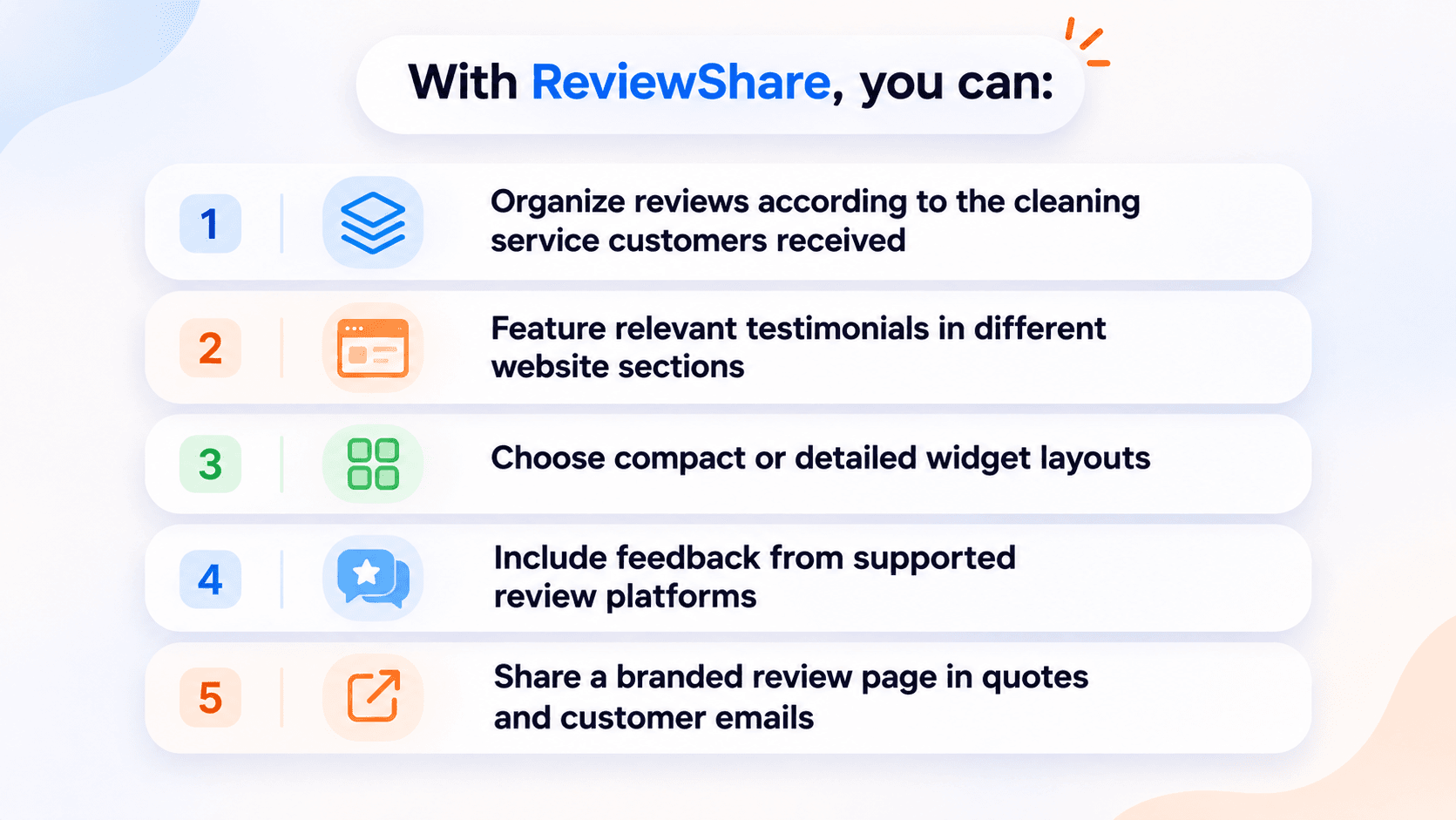
The difference is how extensively the company wants to use its existing reviews.
A basic widget handles website display. ReviewShare provides a broader workflow for organizing and presenting customer experiences.
For a business with only a few Google reviews and one website section to fill, that additional functionality may be unnecessary.
For businesses with multiple services, review sources, and customer touchpoints, it provides more flexibility.
Beyond Website Widgets: One Shareable ReviewShare Page
Website widgets are useful when customers are already browsing a business website.
But customer conversations also happen through email, social media, referrals, and direct messages.
ReviewShare provides a branded page where businesses can present reviews, testimonials, supported social content, and relevant business links.
A real estate agent could include this page in a listing presentation. A cleaning company could add it to a quote email. A salon could place it in its Instagram bio.
The widget and shareable page serve different purposes.
Widgets display customer feedback within a website. A ReviewShare Page makes that feedback accessible through one link outside the website.
Businesses can use both without replacing their existing website experience.
FAQs
1. Can I replace an existing Google Reviews widget with ReviewShare without losing my reviews?
Yes. Your original Google reviews remain on your Google Business Profile rather than belonging to the website widget displaying them.
Connect your supported review source to ReviewShare, configure a new widget, and replace the previous embed code.
Before removing the original widget, confirm that the ReviewShare display loads correctly and shows the intended feedback.
2. Can ReviewShare display different reviews on different service pages?
ReviewShare supports organizing feedback through Review Groups, making it easier to select reviews related to particular services, topics, or locations.
For example, a real estate agency can organize buyer and seller testimonials separately.
Businesses can then use the relevant reviews when configuring displays for different website sections.
3. Which ReviewShare widget layout should I choose for my website?
Choose based on the available space and the length of your reviews.
Carousels work well on service pages and near booking sections. Bento layouts suit detailed testimonial collections. Marquees are more appropriate for shorter reviews displayed in compact sections.
The best layout is one that makes the feedback easy to read without distracting from the page's main purpose.
4. Do Google Reviews widgets improve SEO rankings or visibility in AI search results?
Embedding a review widget doesn't automatically improve Google rankings or guarantee inclusion in AI-generated answers.
Widgets make customer feedback accessible to website visitors, but search visibility depends on factors including content relevance, technical accessibility, and search engine policies.
Businesses should prioritize accurate, useful content and a well-functioning website rather than treating widgets as a guaranteed ranking strategy.
5. Can I combine Google, Yelp, Zillow, and TripAdvisor reviews in one ReviewShare widget?
ReviewShare supports bringing reviews from these platforms into one workspace.
Businesses can organize and select feedback from supported sources when preparing their review displays.
The available source combinations and widget settings should be confirmed in the current dashboard.
For businesses receiving reviews across multiple platforms, this provides a more flexible approach than relying exclusively on a Google-only review feed.